

A building accessibility audit is a report, usually a PDF, listing each barrier that stops a disabled person entering, crossing or using a building, with its location, measured value and required value under the 2010 ADA Standards or Approved Document M. A 3D scan measures doors, widths, turning space and step-free routes; a site visit adds door force and signage.
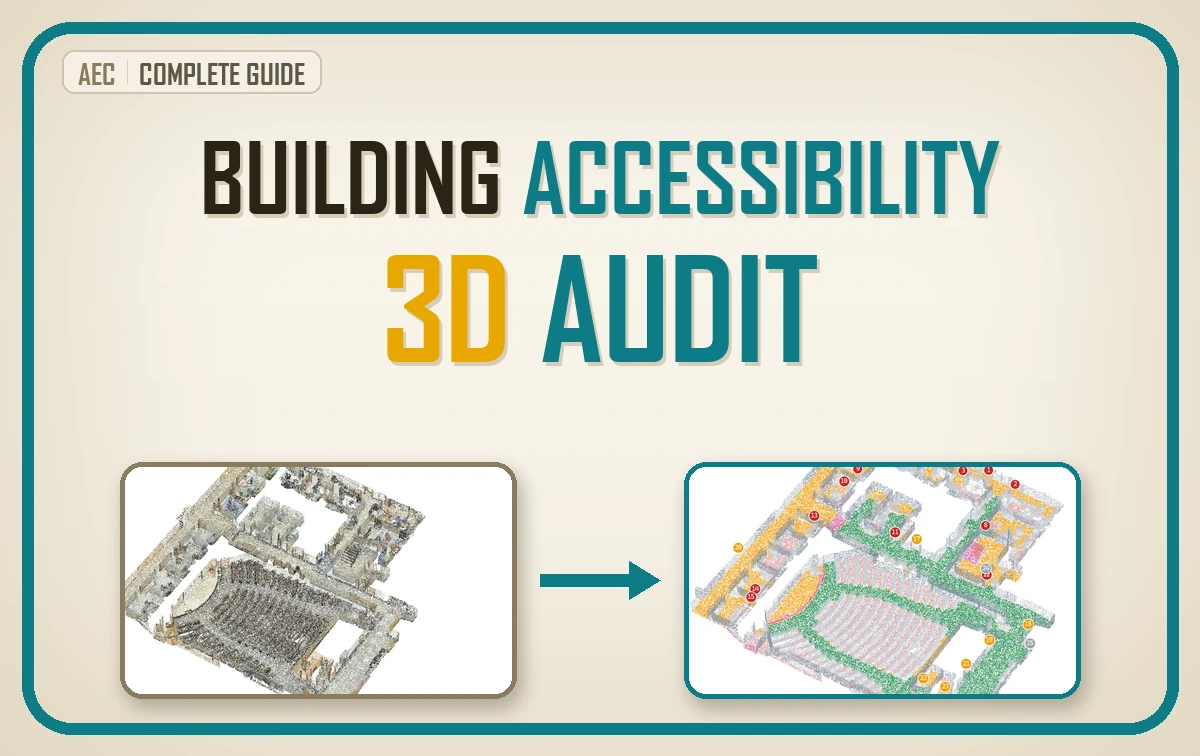
| What it is | A check of whether disabled people can reach, enter and use a building, held against a written standard |
| What you get | A numbered issue list, exported as a PDF audit report, where every line has a place, a measured value and a required value, with fixes ranked by the rooms they open |
| Standards it touches | The 2010 ADA Standards, UK Approved Document M with BS 8300, EN 17210 and ISO 21542 |
| Worked on | A classified scan of part of S3DIS Area 2: a 30.89 by 34.96 m university floor with a lecture hall, offices, corridors and stairs |
| Level | Access consultants, facilities teams and 3D practitioners. No code needed to read it, and a kit to run it. |
On a scanned university floor, one ramp at a single stair flight took a wheelchair from 8 reachable rooms to 16, while widening any one of the six narrow doors on its own reconnected nothing. Rank accessibility fixes by the rooms they reconnect before anyone prices them: an issue list worked in print order funds door jobs that open nothing.
I want to take you through this one the way I would walk a floor with a client. First what an auditor checks and which rulebook sets the numbers, then how the work splits between the scan and the site visit, and finally the decision an audit exists for: which fix to pay for first. Keep going to the end, because that last part is the one I care about most.
- What a Building Accessibility Audit Checks
- Which Accessibility Standard Applies to Your Building
- Manual Survey Versus 3D Scan for an Accessibility Audit
- What a Scan-Based Accessibility Audit Measures Well
- What No Scan Can Tell an Accessibility Auditor
- How to Prioritise Accessibility Fixes by Reach
- Keeping the Accessibility Audit Current in a Digital Twin
- Owning the Building Accessibility Audit Behind the Button
- Frequently Asked Questions About Building Accessibility Audits
Accessibility audits have an odd shape. The rulebook is precise to the millimetre, while the survey behind it is usually one person with a tape, measuring the doors they thought to measure.
A laser scan turns that around: it has measured every surface already, and nobody has asked it the question yet.
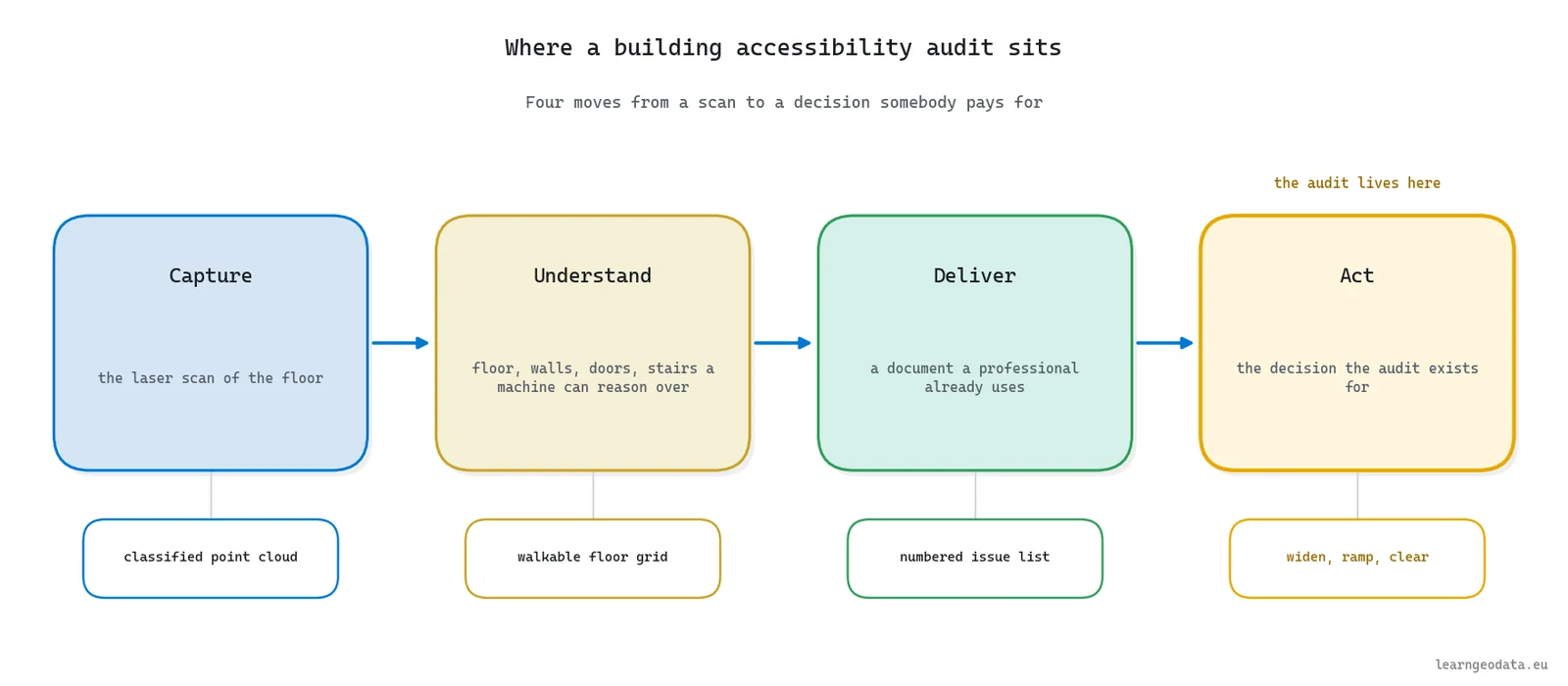
I think about every applied 3D system as four moves. Capture is the scan. Understand turns it into floor, walls, doors and stairs that a machine can reason over. Deliver hands a professional a document they already know how to use, and Act is the decision somebody pays for. An accessibility audit is unusual because its deliverable has no purpose except the Act: widen this door, ramp that flight, clear those cabinets.
What Curb Cuts Teach 3D Accessibility Audits
Every time I ask when a barrier fix first paid back far more than anyone expected, I land on the same pavement in California.
In the early 1970s in Berkeley, California, disability activists including Michael Pachovas poured cement into a kerb, shaped a crude ramp and rolled off it. The city installed its first official curb cut on Telegraph Avenue in 1972, as Angela Glover Blackwell recounts in The Curb-Cut Effect for the Stanford Social Innovation Review.
Then came the part nobody had planned for. Parents with pushchairs, workers with heavy carts, travellers with luggage and runners all headed for the cuts, and Blackwell cites a study in which nine out of ten unencumbered pedestrians went out of their way to use one.
I keep that story close for one reason. A barrier fix earns its budget by the journeys it opens, and a 3D scan is the first survey that can count those journeys across a whole floor instead of guessing at them.
Researchers have started doing exactly that outdoors. In a Sensors paper published on 31 March 2026, Ali Ahmadi and colleagues send a virtual robot, sized to a wheelchair’s clear floor space, through segmented LiDAR point clouds from building entrances to the sidewalk network, ramps included, and read slope, width and step height all along the way.
Five things you will be able to do once you have read this
- Name what a building accessibility audit checks and which of those checks are geometry
- Find the standard that governs your building and read its door, route, turning and ramp figures
- Split the audit between a 3D scan and a site visit without leaving a gap between them
- Rank accessibility fixes by the rooms they reconnect instead of the issues they close
- Keep the audit current as the building changes, inside a building digital twin
What a Building Accessibility Audit Checks
A building accessibility audit is a chain, and before any scanner comes out I want you to hold that whole chain in your head, because every number later in this guide hangs off one of its links.
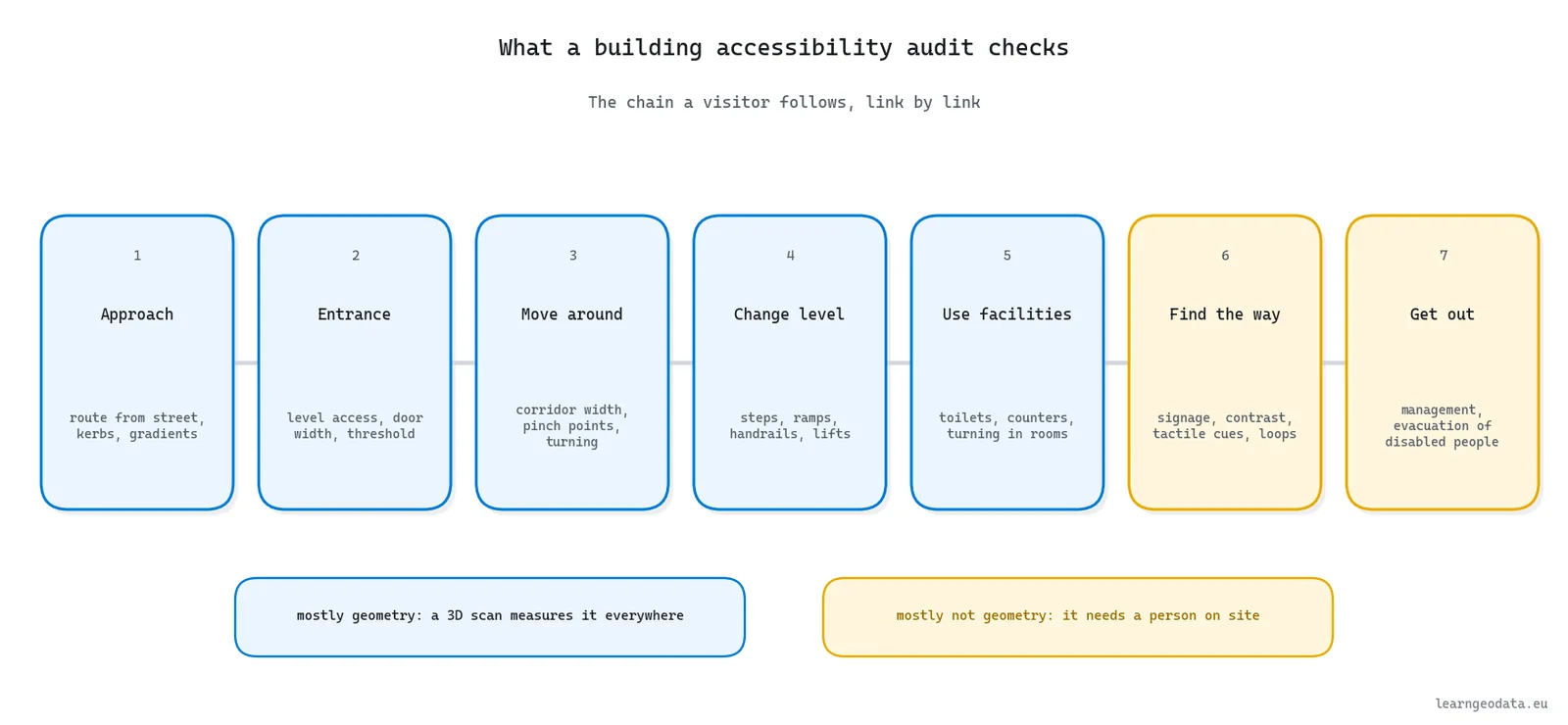
A building accessibility audit checks a building against the chain of movements a disabled person makes: arriving, getting in, moving around, changing level, using the facilities, finding the way and getting out again. Each link has its own measurable requirements and its own way of failing.
The links depend on each other, which is why an audit is a chain and not a pile of findings. A generous corridor is worth little if the toilet at its end has no room to turn, and a perfect toilet is worth nothing behind a 20 cm step.
The scale of the question is not small either. I checked the latest global figure before writing this, and the World Health Organization puts the number of people living with significant disability at about 1.3 billion, or one in six of us. An audit is the document that says, room by room, which of them a building actually lets in.
A Building Accessibility Audit Checklist
Here is the checklist I would hand anyone scoping an audit. Lines 1 to 5 are mostly geometry, lines 6 to 9 mostly are not, and that split decides who measures what later on.
- Approach: the route from the street or car park, kerbs, gradients and drop-off
- Entrances: level access, door clear width, thresholds and the landing in front of the door
- Horizontal circulation: corridor widths, passing places, pinch points and turning space
- Vertical circulation: steps, ramps, handrails and lifts
- Rooms and facilities: turning space in rooms, accessible toilets, counters and seating
- Doors in use: opening force, closers, handles and vision panels
- Wayfinding: signage, visual contrast, tactile cues and lighting
- Communication: hearing loops, announcements and acoustics
- Management: how the building is kept clear, and how disabled people get out in an emergency
🦚 Florent’s Note: A missed room worries me far more than a missed requirement. The worked example in this guide is a floor of 30.89 by 34.96 m holding 38 doors, and a surveyor with a tape decides which of them to visit. The ones nobody visits never reach the report, and nobody can tell from the report that they were skipped.

That is the real promise of a scan for this checklist: lines 6 to 9 still need a visit, and lines 1 to 5 become complete.
Which Accessibility Standard Applies to Your Building
Fair warning: accessibility standards come down to a table of millimetres. Stay with it anyway, because one row in it flips the verdict on the very same door.
The accessibility standard that applies to your building depends on where it stands and who uses it, and the figures differ enough between jurisdictions to flip a verdict on the same door.
I went to the primary texts for every figure in the table below, and here is where each one lives.
In the United States, the 2010 ADA Standards for Accessible Design govern public accommodations and commercial facilities, and the US Access Board publishes the technical text chapter by chapter, with routes, doors and ramps in chapter 4. In England, Part M of the Building Regulations is met for non-domestic buildings through Approved Document M, Volume 2, which points to BS 8300 for detailed design.
Across Europe, the picture is harder to quote. EN 17210:2021 sets functional accessibility requirements for the built environment, and its revision, expected in autumn 2027, adds an Annex A of specific values. ISO 21542:2021 is the international reference. Both are paid documents, so I quote no figures from them here. Read the clause your contract names, in the edition it names, rather than somebody’s summary of it.
| Requirement | 2010 ADA Standards | Approved Document M, Volume 2 (new buildings) |
|---|---|---|
| Door clear width | 815 mm (404.2.3) | 800 mm straight on, 825 mm off a 1200 mm route, 1000 mm for external public doors (Table 2) |
| Corridor or route width | 915 mm (403.5.1) | 1200 mm unobstructed (3.14) |
| Turning space | 1525 mm circle (304.3.1) | 1500 by 1500 mm landing at accessible entrances (2.7) and in front of lifts (3.28) |
| Steepest ramp | 1:12 (405.2) | 1:12 for a 2 m going, down to 1:20 for 10 m (Table 1) |
| Rise per ramp run or flight | 760 mm (405.6) | 500 mm (1.26) |
| Door opening force | 22.2 N, interior hinged doors (404.2.9) | 30 N at the leading edge, 0 to 30 degrees (2.13) |
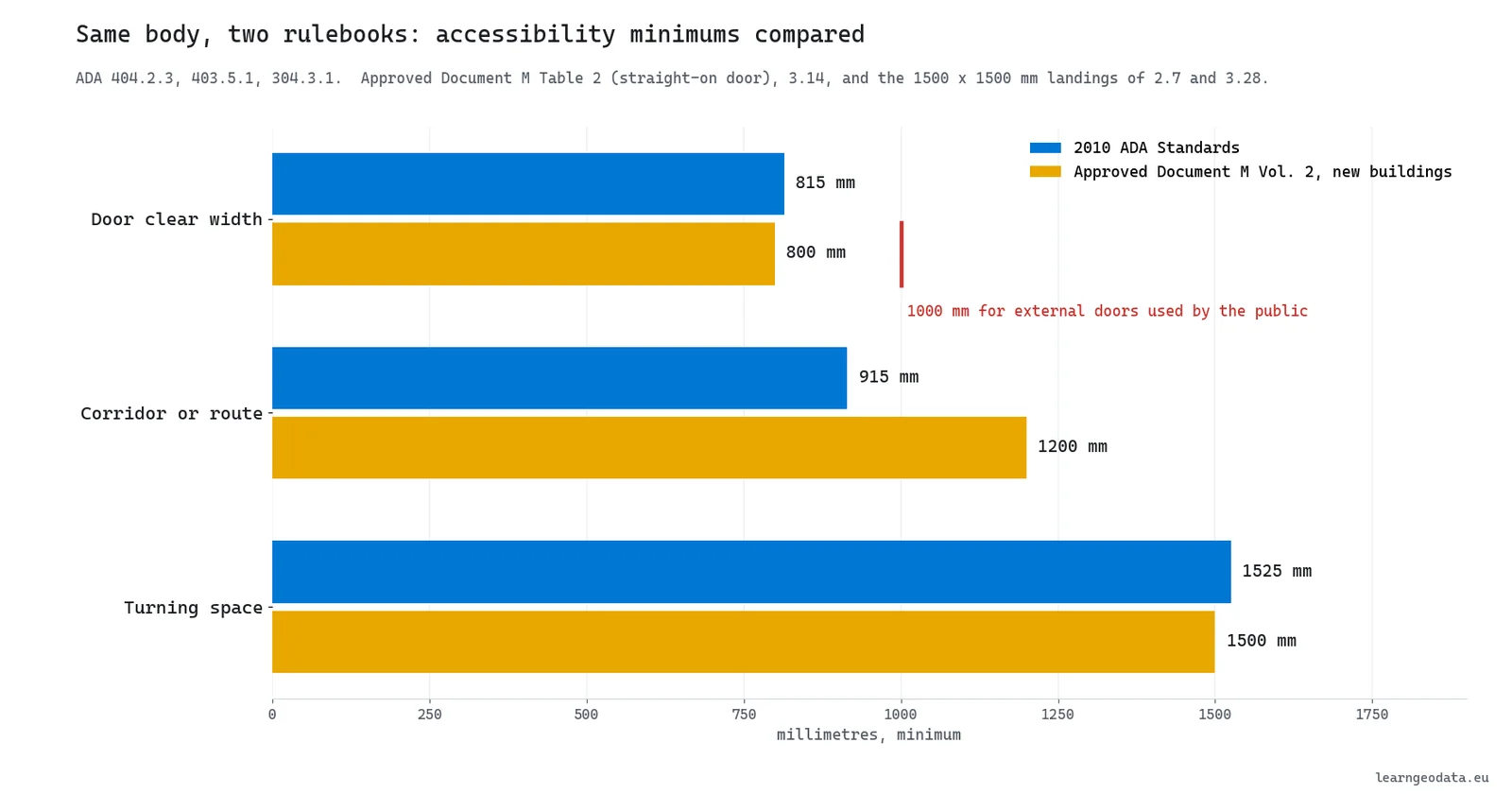
Look at the door row for a second. A door measured at 0.90 m clears the ADA by a comfortable margin and fails Approved Document M if it is the public entrance. The building did not change between those two verdicts, only the profile you held it against did.
Ramps tell the same story in a different unit. The ADA lets one 1:12 run rise up to 760 mm, while Approved Document M caps any flight at 500 mm and only accepts 1:12 on a short 2 m going.
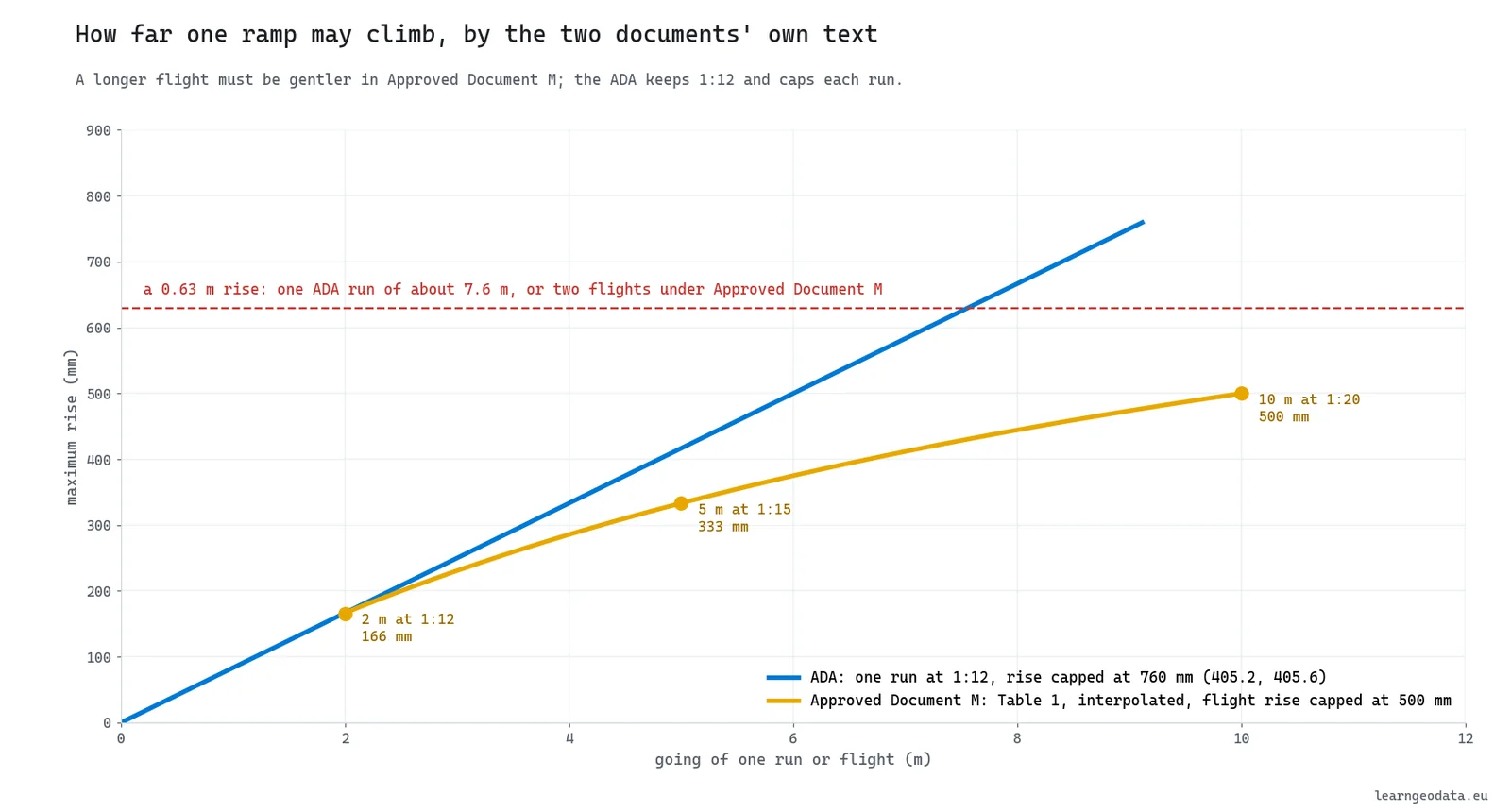
🦥 Geeky Note: Approved Document M lets you interpolate Table 1 between its rows: 1:14 for a 4 m going and 1:19 for a 9 m going are its own examples. Encode it as a function of the going, not as three constants, or your audit will fail a 6 m ramp at 1:16 that the document accepts.
The cleanest way I know to stay honest about all this is to treat each standard as a profile: a handful of numbers, written down once, with the clause next to each.
# Audit profiles, figures from each document's own text, in metres.
PROFILES = {
    "ada_2010": {"door": 0.815, "route": 0.915, "turn": 1.525,
                 "ramp_max": 1 / 12, "ramp_rise": 0.760},
    "adm_vol2_new": {"door": 0.800, "door_public_external": 1.000,
                     "route": 1.200, "turn": 1.500, "ramp_rise": 0.500},
}
Holding the same scan against both profiles costs nothing extra, because the survey is done once and each profile is only a new judgement on top of it.
Manual Survey Versus 3D Scan for an Accessibility Audit
A manual survey and a 3D scan both have a place in this audit, and having started as a land surveyor myself, I am not here to bury the tape. Each tool owns a half of the audit, and it pays to know which.
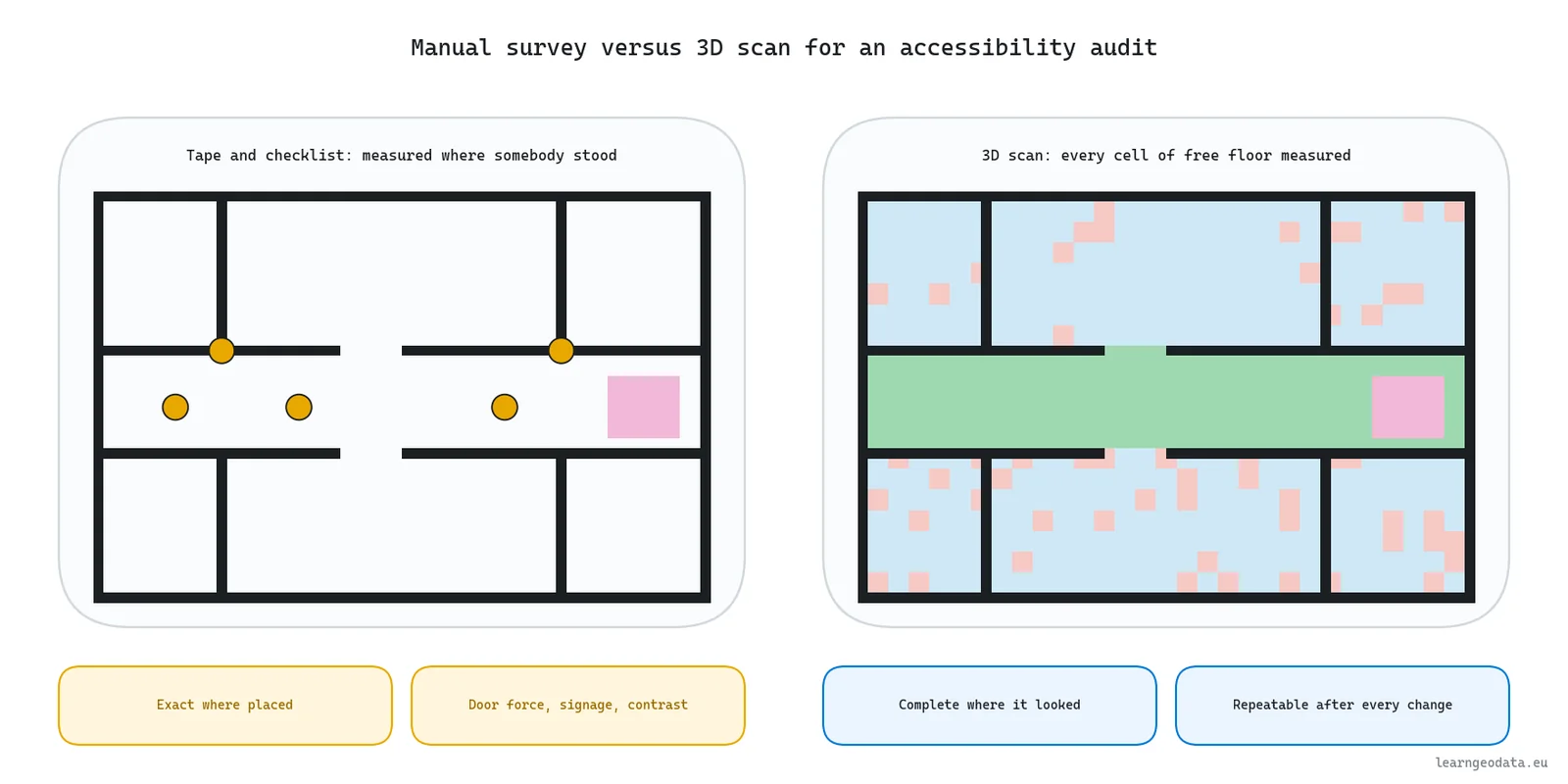
A manual accessibility survey and a 3D scan answer different halves of the audit. The tape measures what the surveyor chooses to measure, the scan measures everything it saw, and neither one measures what it never reached.
| What the audit needs | Manual survey (tape, laser meter, checklist) | 3D scan with automated checks |
|---|---|---|
| Coverage | The doors and corridors the surveyor visits | Every surface in sight of a scan position |
| Clear width | At a few chosen points | At every 5 cm cell of floor in the worked example |
| Turning space | Judged by eye, measured in a few rooms | Tested over the whole floor with a 1.50 m disc |
| Step-free reach from the entrances | Inferred from a walk | Computed over the whole floor, for each profile |
| Door force, handles, contrast, signage, loops | Measured or observed on site | Not seen at all |
| After a layout change | A new visit | A rerun on a new scan |
| Evidence per issue | A photo and a note | Coordinates, a measured value and a required value |
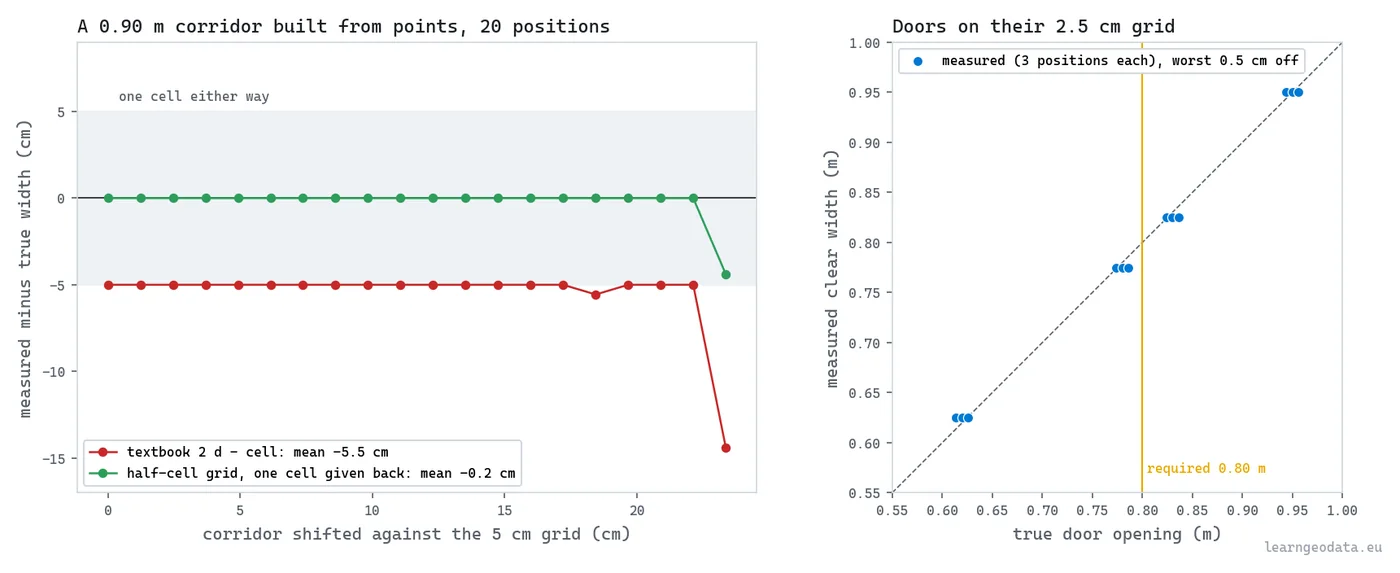
Accuracy is where people expect the scan to lose, and it is more subtle than that. In the worked example a corridor is read to within one 5 cm cell and each door to within one 2.5 cm cell of its own jambs, so a door that reads exactly 0.80 m is a door to tape on site before anyone signs anything.
The estimator matters as much as the scanner. The textbook way of turning a distance transform into a width reads a 0.90 m test corridor 5.5 cm too narrow on average and 14.4 cm at worst, while a corrected one lands at 0.2 cm. Against a 0.90 m threshold, that bias alone is the verdict for every corridor near the limit.
🌱 Growing Note: Run both methods on the same floor once. Tape ten doors, then compare your readings with the scan’s for the same ten. In the worked example the test doors come back within 0.5 cm of their built width, and your own ten will tell you what your scanner and your classes are worth before a client asks.
What a Scan-Based Accessibility Audit Measures Well
A scan-based accessibility audit is where the story gets good: it measures part of the audit better than anybody with a tape, with the measured numbers next to each claim.
A scan-based accessibility audit measures three things better than any tape: the clear width at every point of the floor, where a turning circle fits, and which rooms a wheelchair reaches without ever leaving step-free floor.
Every figure in this section comes from the P24 tutorial’s own code. I wanted numbers you could reproduce, so the scan is a public one: a classified slice of S3DIS Area 2, the Stanford indoor benchmark released with Armeni and co-authors’ CVPR 2016 paper, a 30.89 by 34.96 m university floor holding a raked lecture hall, offices, corridors and stairs. The whole audit runs in 3.7 s on a CPU.
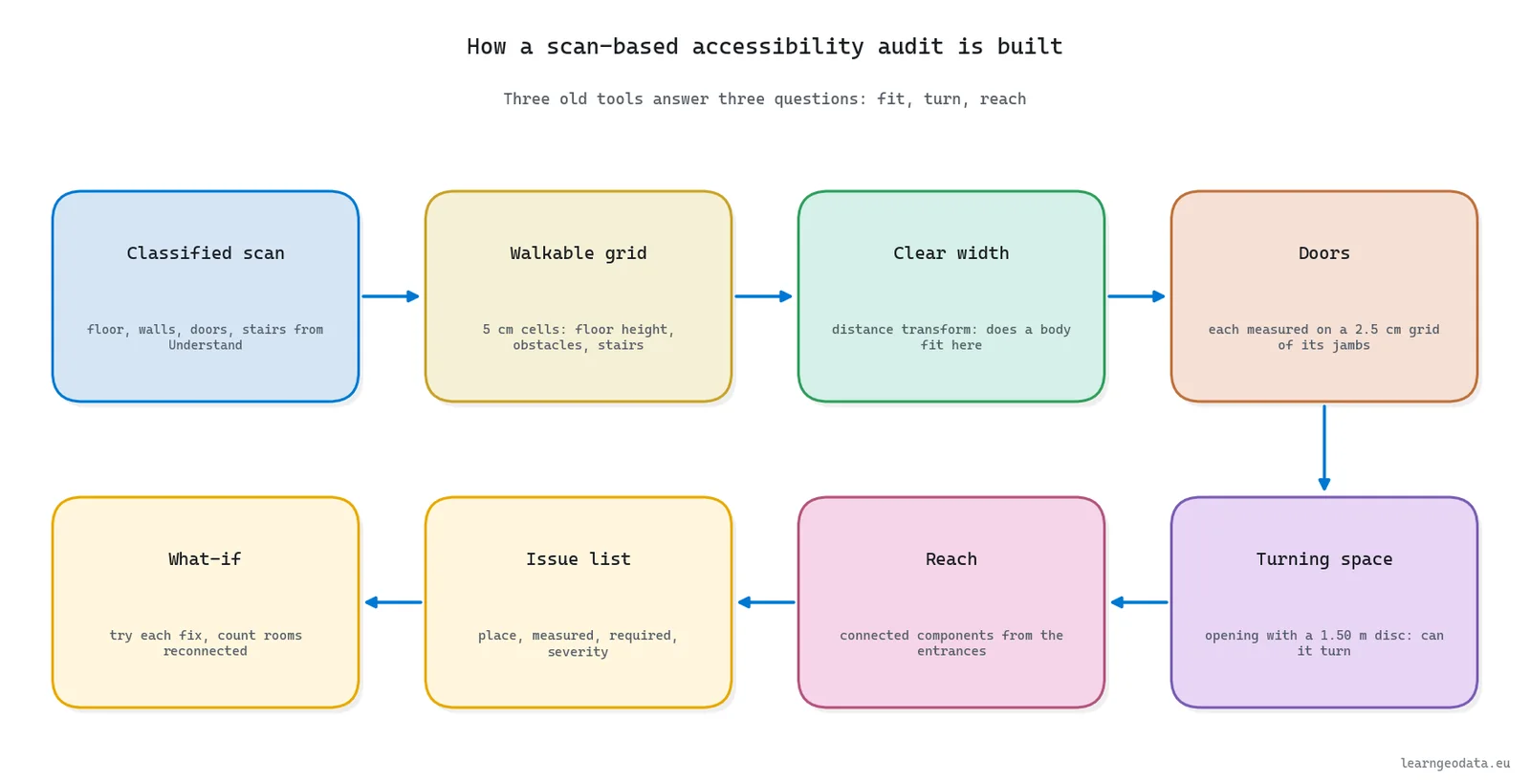
The method itself is three old tools: a distance transform for “does a body fit here”, a morphological opening for “can it turn”, and connected components for “can it get there at all”. The Medium tutorial for this article teaches each one with code; what follows is what they report and why it matters to an auditor.
Clear Width Everywhere on the Floor
One distance transform, computed with SciPy’s exact Euclidean implementation, gives the clear width at every 5 cm cell. On this floor 181.7 m2 of the 564.1 m2 of free floor is at least 0.90 m wide, and the median free cell sits at 0.55 m, because free floor hugs walls, desks and chair rows.
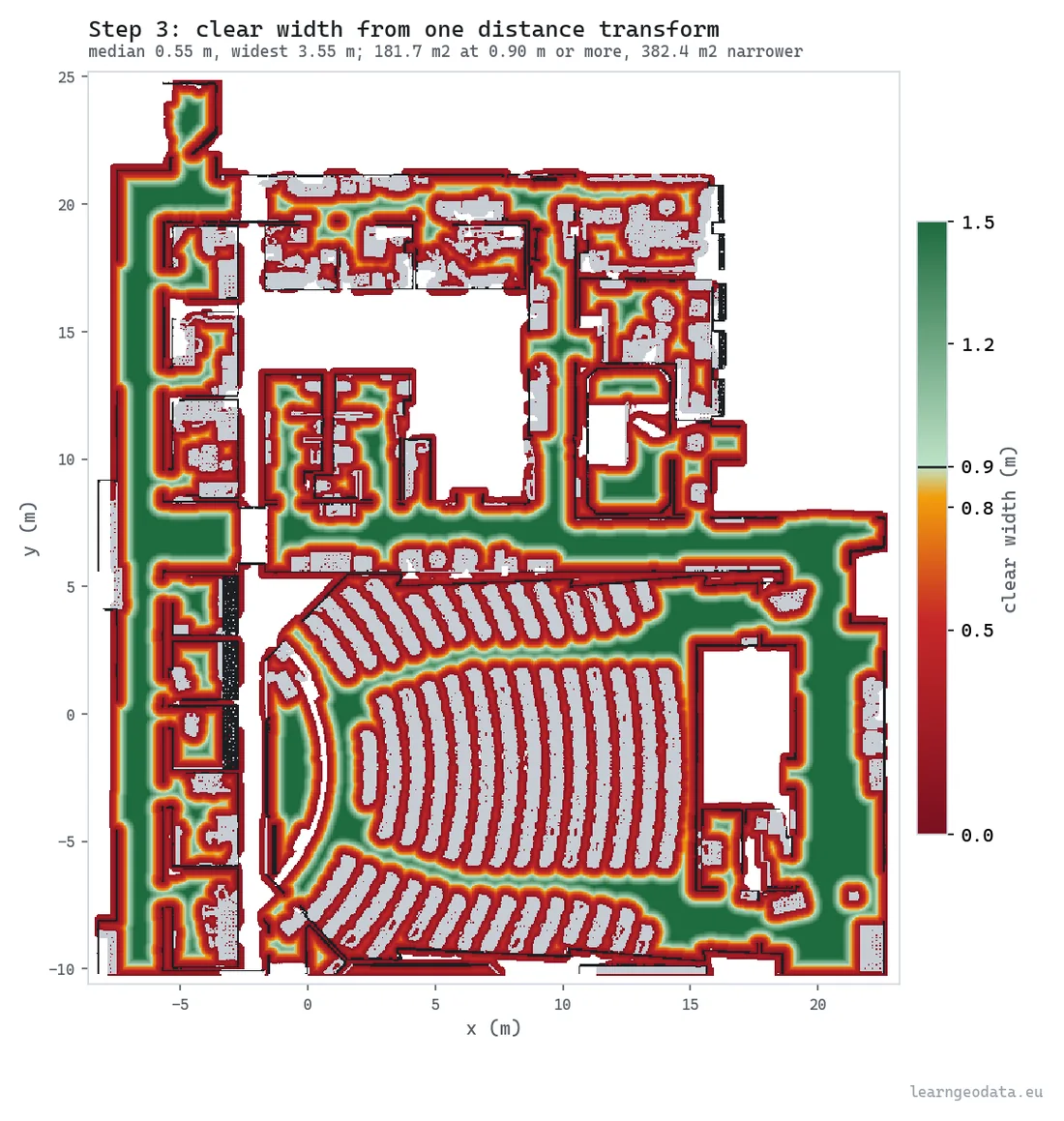
That median is not a verdict, and it is worth saying why. A wheelchair needs one continuous path wide enough for it, whatever the cells beside that path measure, and reach answers that question further down.
Every Door Against the Required Width
A door verdict often hangs on two or three centimetres, which is why each doorway gets a second, finer measurement on a 2.5 cm grid built from its own jamb points. The scan holds 38 doors. Of the 35 it could measure, the median clear width is 1.03 m, the widest 1.70 m, and six fall under 0.80 m: three at 0.625 m and three at 0.725 m.
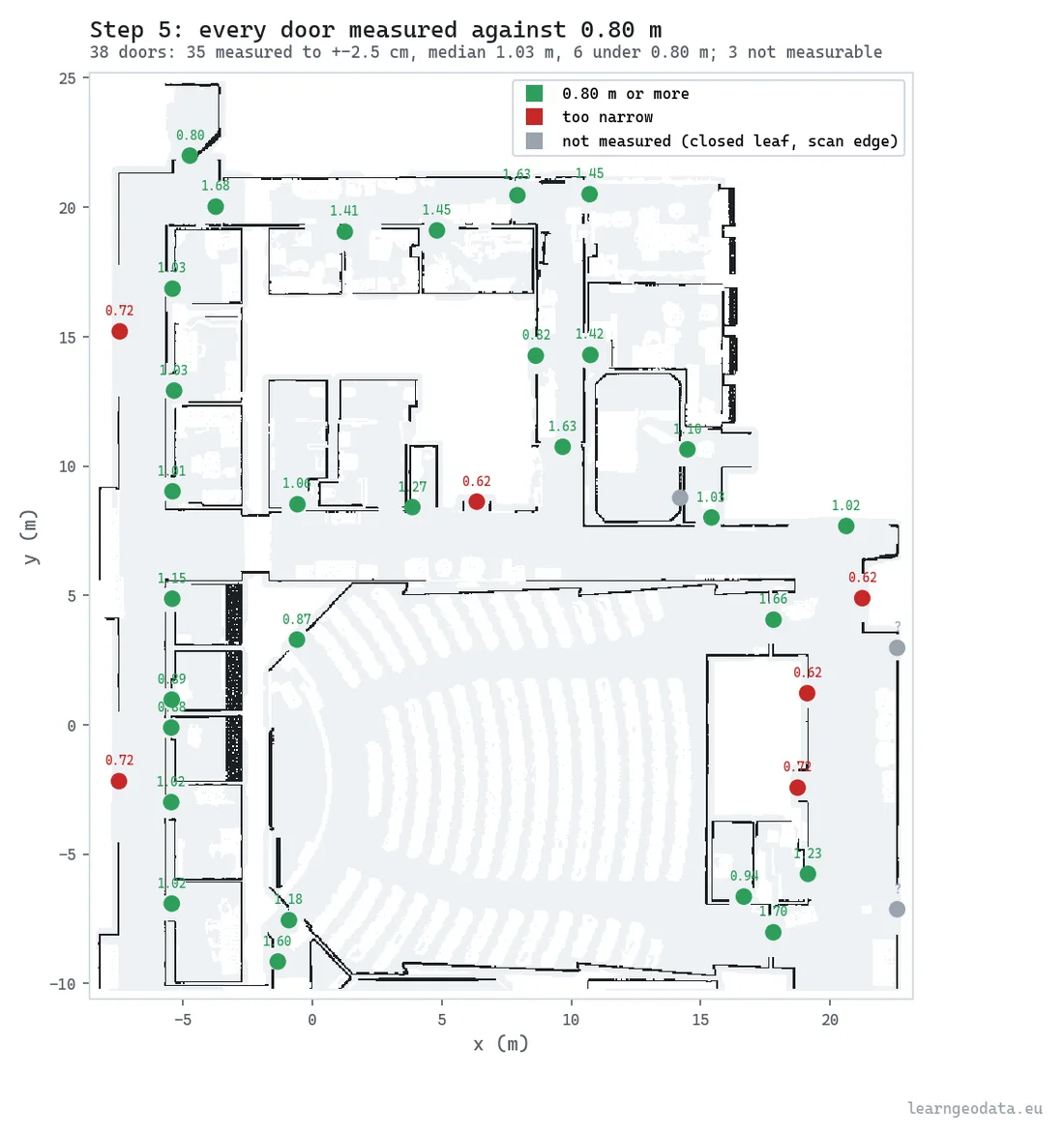
The three grey dots are the line I would defend hardest in front of a client. One is a closed leaf with no floor visible through it, and two are the entrances, where the scan stops just outside and the edge of the data would otherwise pass for a 0.33 m door. An audit that can say “not measured” is one you can trust when it says “too narrow”.
Turning Space With a 1.50 m Disc
Turning space is found with a morphological opening: roll a 1.50 m disc over the free floor and keep every cell it can cover while lying flat. The trap is the size of the disc. Build it from the radius instead of the full diameter and the check prints “1.50 m” while testing a circle half that size.

On this floor the correct element finds 281.6 m2 of turning floor. Swap in the half-size element and the same floor reports 403.8 m2, a 43 % overstatement made of office corners no wheelchair could ever turn in.
🪐 System Thinking Note: A check that quietly tests the wrong disc passes 43 % more floor than the rule allows, and nothing on the plan looks wrong. The defence is cheap: compute the same set two ways and compare. The tutorial derives the turning centres twice, once by erosion and once from the distance transform, and the two sets match cell for cell (100 %) on the university floor as well as in the synthetic tests.
Step-Free Reach From the Entrances
Step-free reach labels every connected patch of floor where a wheelchair’s centre can stand, then keeps the patches that touch an entrance. Run it once for a wheelchair profile and once for a walking profile that may climb stairs, and the gap between the two is the audit’s headline: rooms people can reach on foot and not on wheels.
How many rooms land in that gap depends on two definitions, and both are decisions rather than measurements. What counts as a room (here, floor sealed at gaps narrower than a 0.50 m walker), and what counts as reaching one (here, 0.5 m2 of its floor covered by the chair’s body). Change either and the headline count moves, so the deliverable has to state both next to the number.
Proof the Accessibility Audit Holds Still
An audit you cannot rerun to the same answer is not one you can sign. The tutorial ships 46 known-answer tests on synthetic scans, built so the true width, door or room is known in advance, and they all pass in about 2 s.
The real scan got the same treatment. Rebuilt seven ways (its own order, shuffled, and with every coordinate rounded), a naive version of the audit counted between 12 and 14 narrow doors, while the stable one counted 6 on all seven and printed an identical issue list each time. Four choices close that gap: a grid on a fixed lattice, the unbiased width, doors on their own fine grid, and rooms sealed at walker width.
A second opinion comes from Neurones 3D, whose accessibility engine was written separately and audits the identical floor. Quoted from its explainer run, it reads the same 0.55 m median clear width, and 5 of its 39 doorways under 0.80 m, the narrowest at 0.59 m.

That click is the real interface of the deliverable. Nobody in facilities wants a list of x and y values; they want to click line four and see the doorway, and every line on the list carries the coordinates a viewer needs to do that.
Get the Accessibility Audit Materials
If you would like to check every number above on your own machine, the wheelchair accessibility audit kit has the audit script, the 46 tests, the stability check and the reference issues.csv to diff against. Stanford’s terms keep the S3DIS data itself out of the kit, so it ships a preparation script instead: request the dataset, point the script at your copy, and you get the same input file, fingerprint and all.
The step-by-step build, with the code for each tool, is the Medium tutorial (https://medium.com/p/3ecef96a5a6f), and the code lives in the wheelchair-accessibility-audit folder of the 3d-data-materials repository.
What No Scan Can Tell an Accessibility Auditor
Every scan has limits in an accessibility audit: a point cloud is blind to a good half of what makes a building usable, and pretending otherwise puts a green tick on doors nobody can push open.
No scan can tell an accessibility auditor how hard a door is to push, whether a sign can be read, whether a hearing loop works, or whether the corridor is kept clear on an ordinary Tuesday. Those checks have no geometry, so they need a person on site.
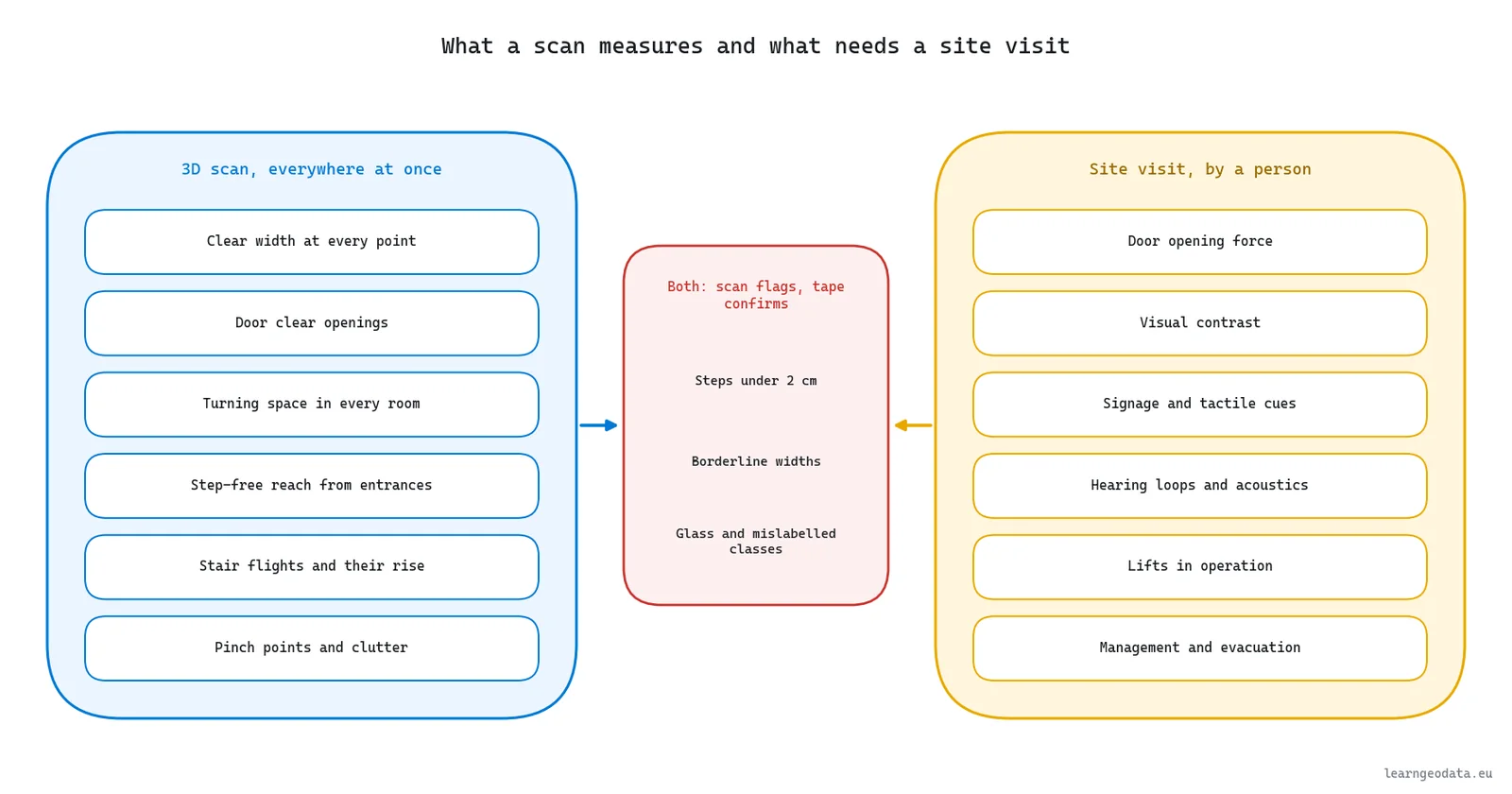
The invisible list is longer than people expect:
- Door opening force: 22.2 N for interior hinged doors under the ADA, 30 N at the leading edge under Approved Document M
- Visual contrast between walls, floors, doors and ironmongery
- Signage, tactile cues and lighting levels
- Hearing loops, announcements and acoustics
- Lifts and platform lifts in actual operation
- Fittings in accessible toilets, and how staff manage the building day to day
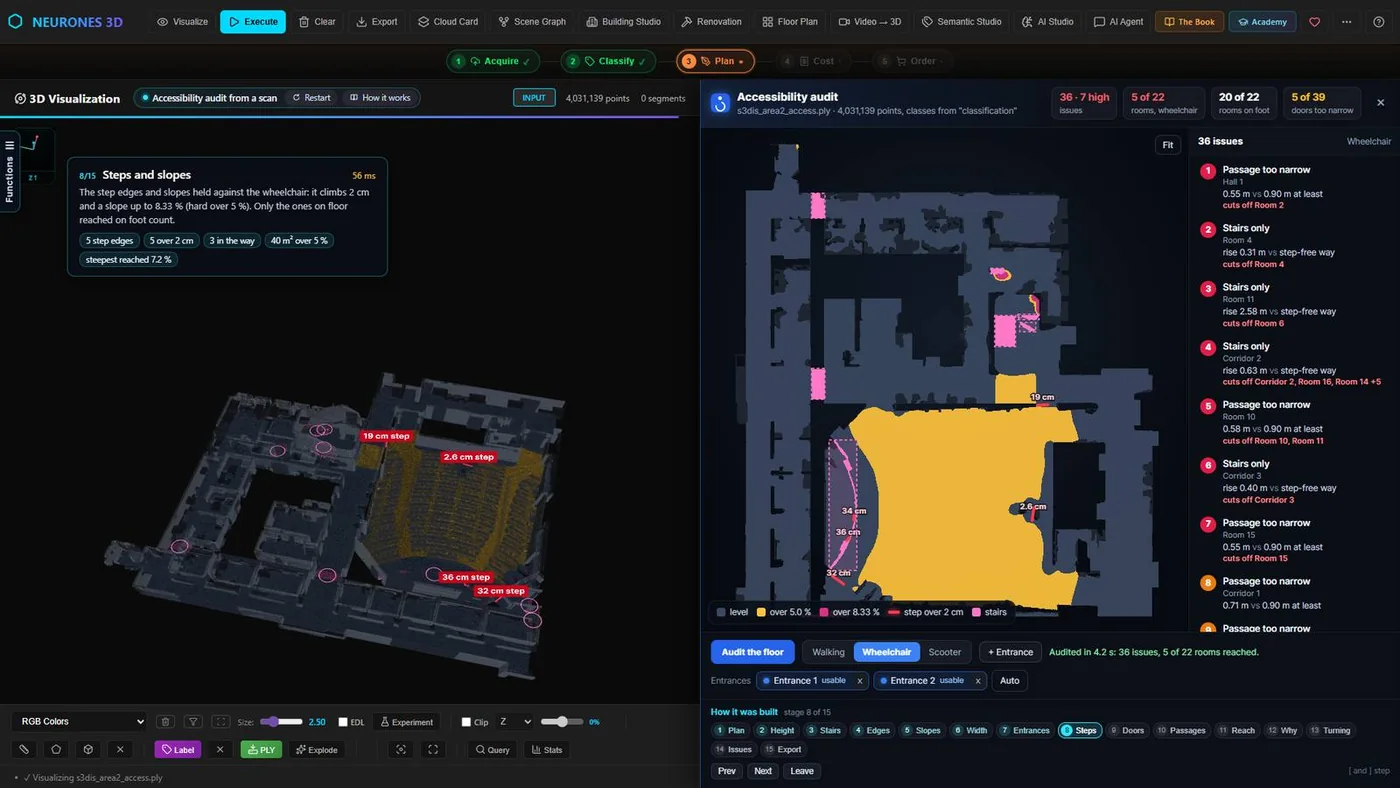
Then there is the geometry a scan sees badly. Small level changes are the big one: the ADA’s section 303 asks for a ramp above 13 mm, and Approved Document M caps an entrance threshold at 15 mm, while the tutorial’s own guard only stops at a 5 cm jump between neighbouring cells. Measuring a 2 cm edge on a floor with a centimetre of noise needs its own method.
Classification is the other blind spot. Call a glazed door “wall” and every room past it vanishes from reach; call a knee-high planter “floor” and the audit happily routes a wheelchair through the soil. The audit is only as good as the Understand stage that produced its classes, which is why I would read a point cloud segmentation guide before trusting anyone’s labels, mine included.
🦚 Florent’s Note: I would rather be straight about the gains than oversell a tool, so I would print “triage” on the cover of every scan-based audit. On the worked example its job is to send a surveyor with a tape to the 6 narrow doors and the 3 unmeasured ones, not to all 38. That is an afternoon saved, and a far better afternoon spent.
How to Prioritise Accessibility Fixes by Reach
With my kids I always test a simple idea before moving to complex ones, and ranking accessibility fixes works the same way. One fix at a time on the grid first, pairs only after that, and this is where one ramp outran six doors.
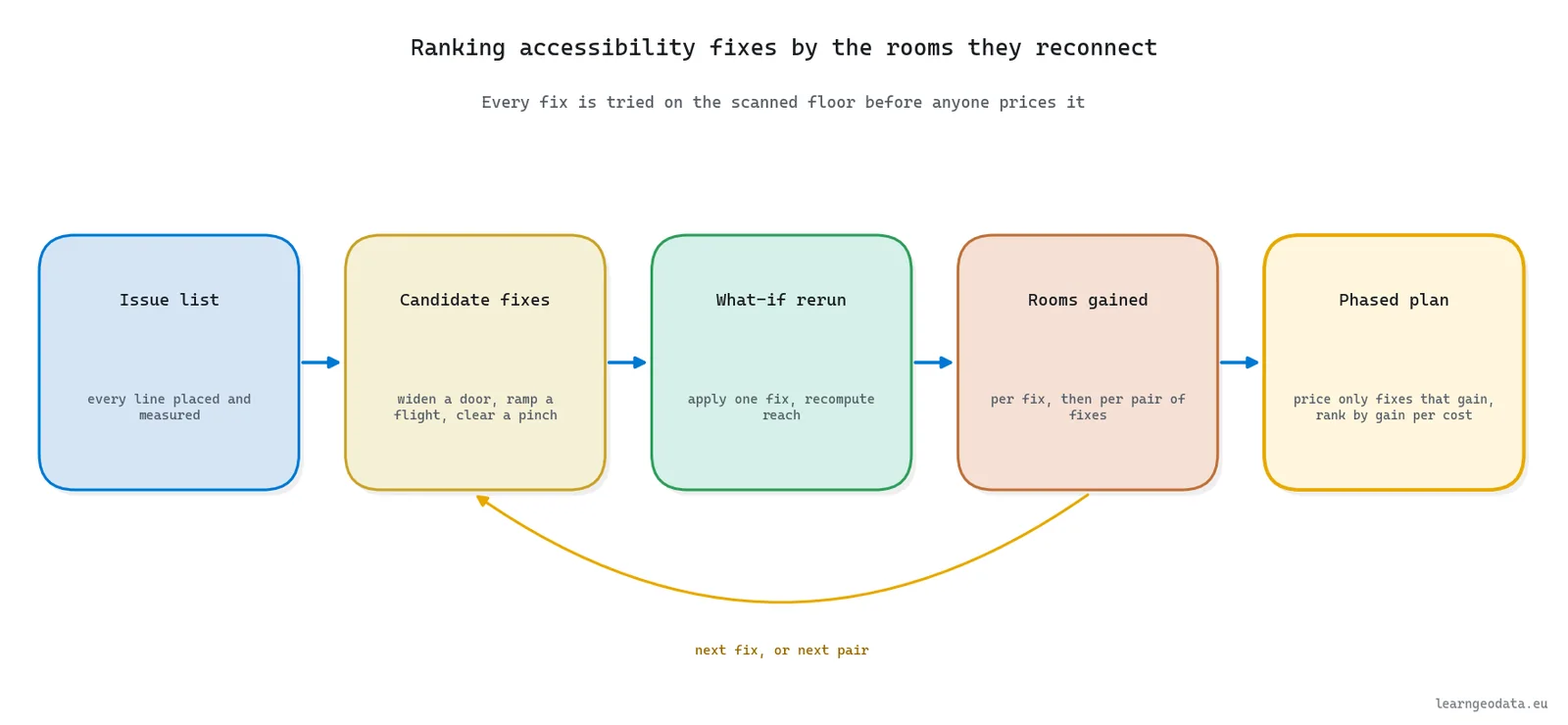
Prioritising accessibility fixes by reach means ranking every candidate fix by the rooms it reconnects to the entrances, and only then by its cost, instead of working down the issue list in the order it was printed. The procedure is short:
- Freeze the survey: one scan, one classified floor, the entrances set, the profile chosen.
- List the candidate fixes: each narrow door widened, each stair flight replaced by a ramp, each pinch cleared.
- Apply one fix to the floor grid and recompute reach, which takes well under a second.
- Record the rooms each fix gains, and price only the fixes that gain something.
- Try pairs, because some fixes only pay off once another one is in.
- Write the ranking into the deliverable, with the room and reach definitions stated beside it.
On the worked example the ranking was lopsided, which is exactly why it is worth running. Widening any one of the six narrow doors on its own reconnected nothing, because each sat behind another barrier or led somewhere already reached. One ramp, at the stair flight between the main corridor and the raised west corridor, reconnected that whole corridor and the offices along it.
That is a curb cut in miniature. One barrier removed, a whole wing of journeys opened, and an issue list that looked like six door jobs and a staircase turns into one clear first move.
The ramp still has to fit. Neurones 3D measures a rise of about 0.63 m on that flight’s treads. Under the ADA a single 1:12 run of roughly 7.6 m covers it, inside the 760 mm cap, with 1525 mm landings at each end.
Under Approved Document M no flight may rise more than 500 mm, so the same rise needs two flights with a landing between them. Whether the corridor can spare that much length is for the architect to answer, but the conversation now opens on measured figures rather than a hunch.
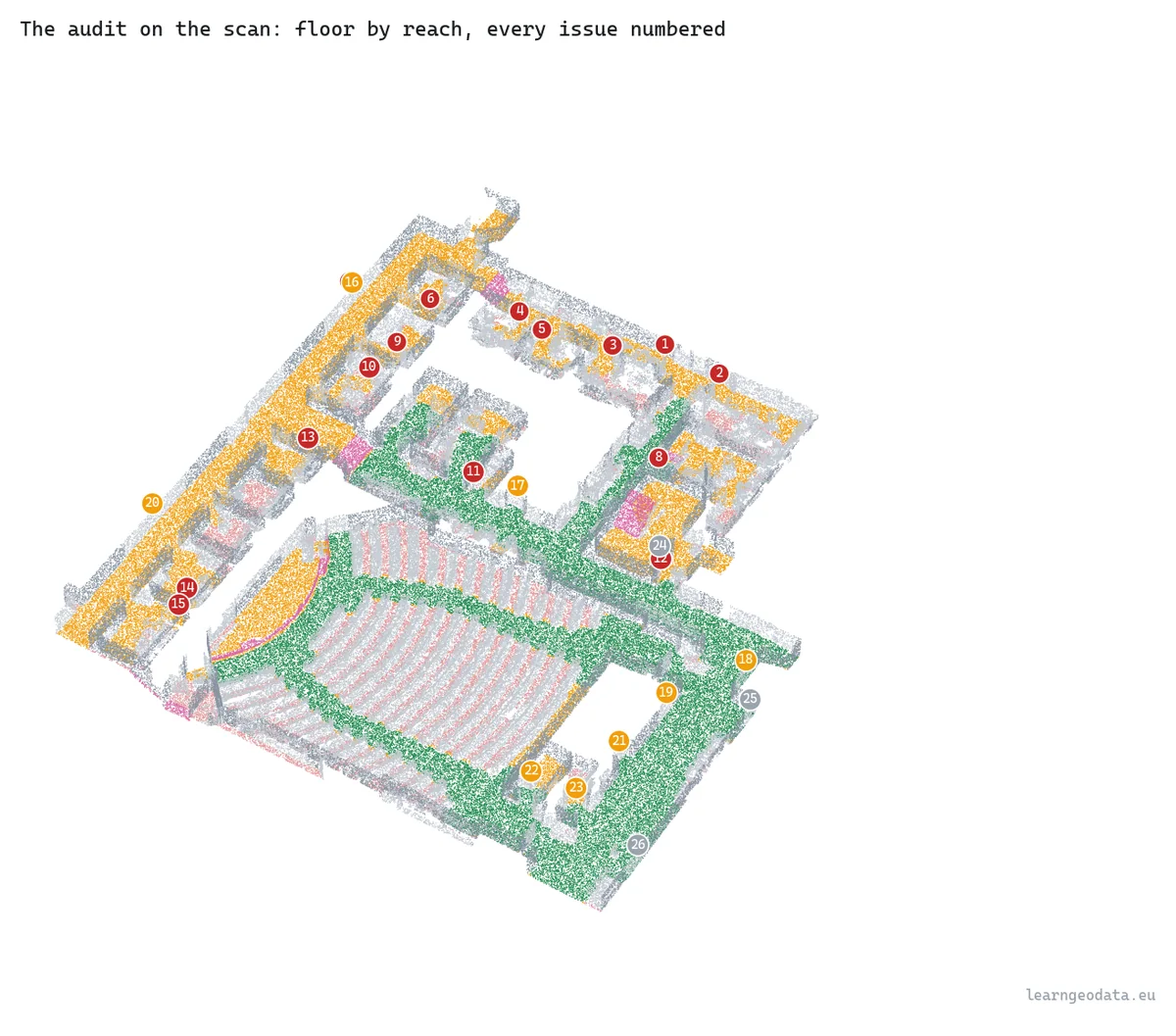
🦥 Geeky Note: Pairs sound expensive and are not. Six doors and six flights make 66 pairs, and at about 175 ms per re-judgement of the floor the whole table takes around 12 seconds. Ranked by rooms gained per unit of cost, that table is a phased accessibility plan.
Keeping the Accessibility Audit Current in a Digital Twin
Picture the same floor a year from now, after two refits and a row of cabinets nobody told you about: that is the floor an accessibility audit in a digital twin has to describe.
An accessibility audit kept inside a building digital twin reruns whenever the building changes, so the issue list describes the building as it stands this quarter rather than the day somebody last walked it with a tape.
Buildings drift. A row of cabinets lands in a corridor, a partition moves during a refit, a meeting room becomes storage. None of that shows up on the drawings, and all of it shows up in the next scan, which is the argument for treating the audit as a process that reruns instead of a report that is filed.
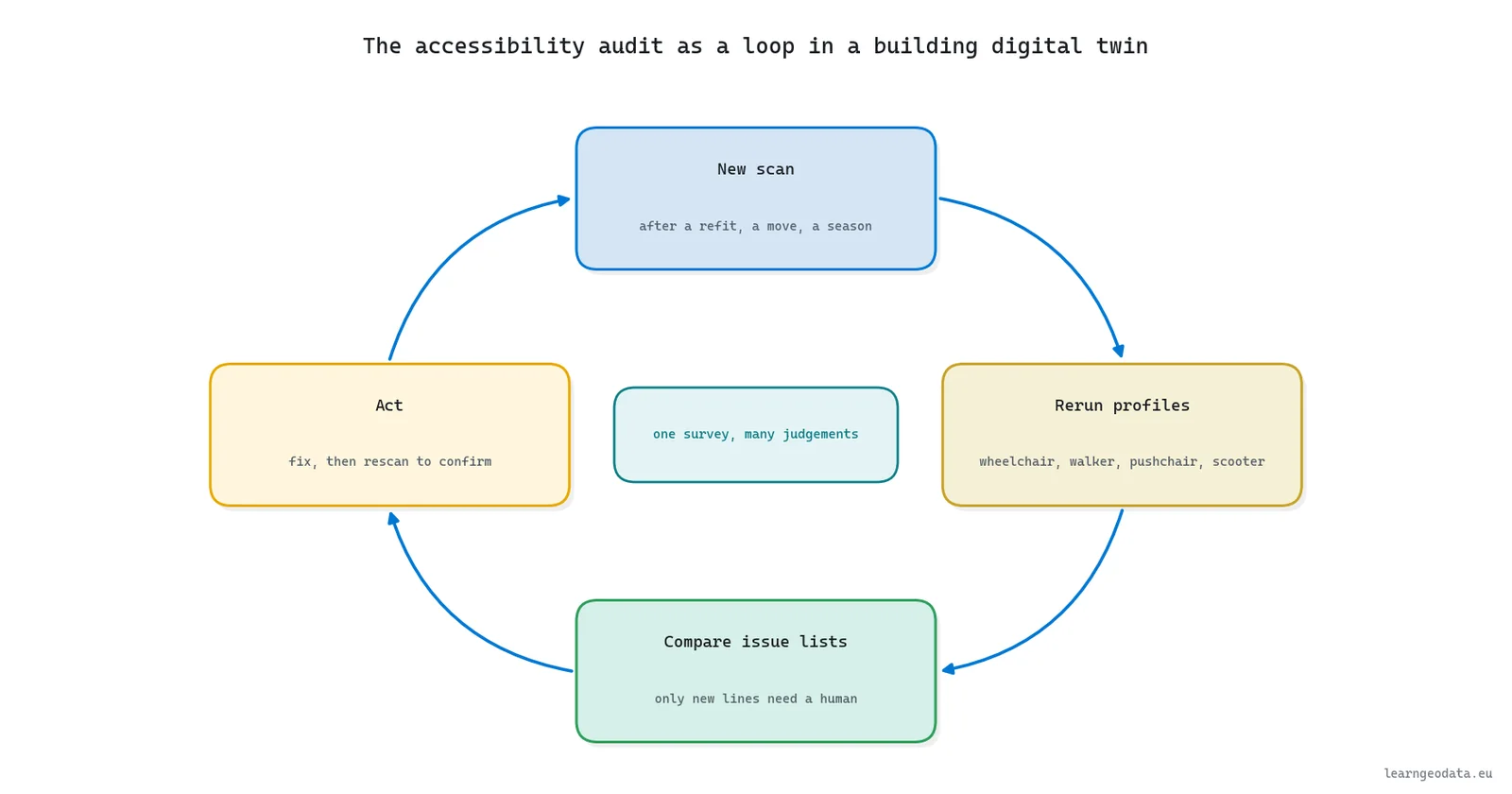
Profiles are the second reason to keep it live. The same survey can be judged for a wheelchair, a walker, a pushchair or a mobility scooter, and in Neurones 3D switching bodies costs 844 ms, by its own figure. Somebody planning a visit could ask whether they can reach a particular seminar room, with their own body, before they set off.

The audit also sits on the same floor as its neighbours in a twin. The walkable grid that says where a wheelchair can go is the one an egress analysis from a 3D scan uses to measure the walk to every exit, and the as-built floor plan is the drawing the issue list gets printed on. The building digital twin guide maps how those use cases share one survey.
🪐 System Thinking Note: Once an audit reruns, it becomes a monitoring signal. Compare two issue lists and the new lines are exactly the changes that broke access, each with a coordinate attached. Neurones 3D’s whole traced run on this scan takes 7.4 s, short enough to run on every upload of a new capture.
Owning the Building Accessibility Audit Behind the Button
Owning the building accessibility audit matters more to me than any heat map in this guide. A tool can draw the coloured plan; you are the one who explains it at the budget meeting.
Owning a building accessibility audit means you can explain every line of it: which clause set the number, how the width was measured, what counted as a room, and why a door came back “not measured”. That explanation is the product, far more than the coloured plan.
Accessibility buttons are appearing in plenty of tools. Press one by all means, but learn what runs underneath, because when its green tick sits over a toilet block no wheelchair can get to, the client calls you, and the vendor never hears about it.
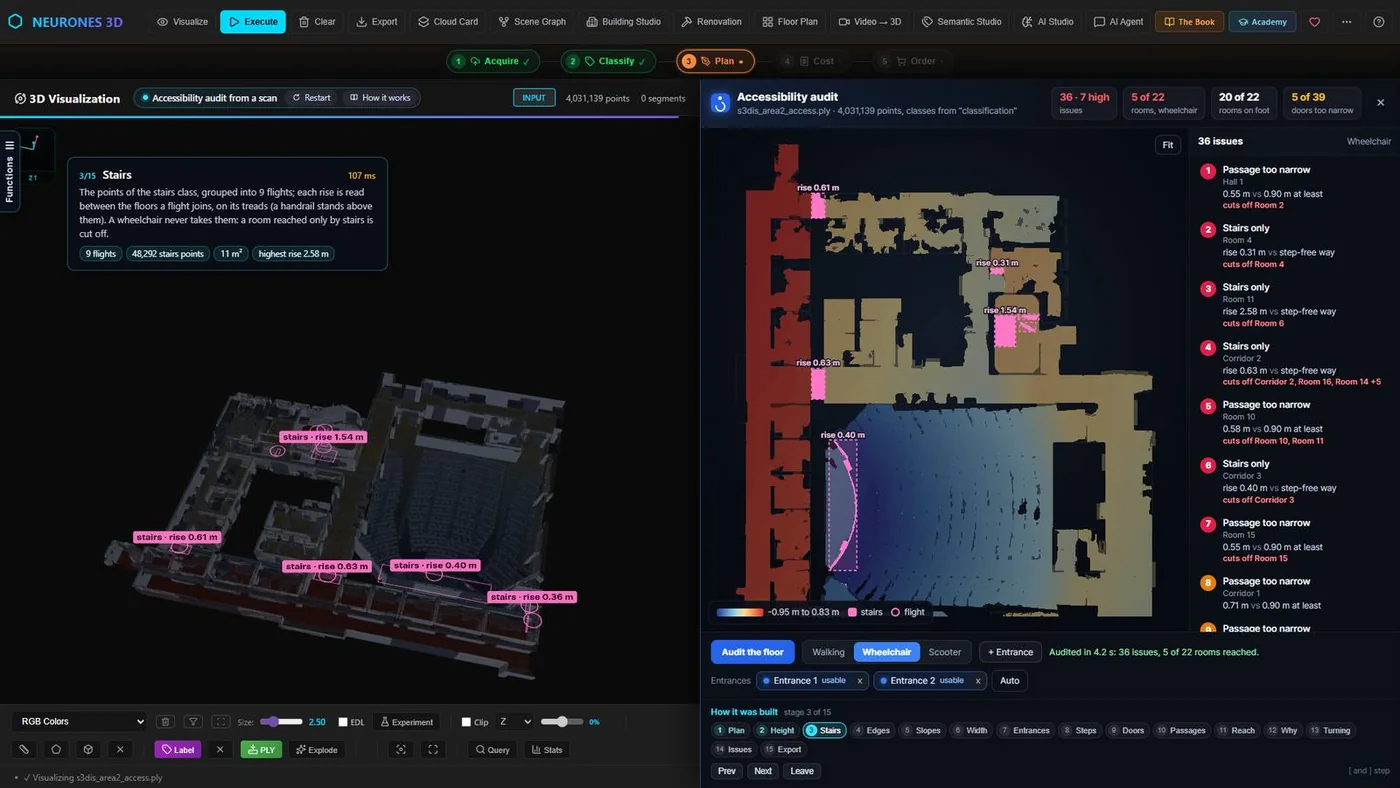
The question, the method that answers it and the checks that prove it are yours to choose. The engine that runs them, which for me means the Neurones Engine application and the Neurones Science SDK, can change underneath without any of them changing. Choosing the method for a specific question is the science, and that part stays ours, however good the tooling gets.
So start with something you can rerun. Take the accessibility audit kit, point it at a classified scan of a floor you know, set the entrances, then print the list and test it on foot, line by line. Every line you would argue with is a lesson about your scan, your classes or your profile, and those lessons are worth more than this guide.
When the audit leaves your hands it is a PDF report a client can file. Neurones 3D exports it beside an SVG plan, a DXF drawing and the CSV issue list, and the kit writes that same issue list, so every line of the report can be checked against the script.
Step edges at centimetre precision, slopes, flights of stairs and the exported PDF report each deserve a proper build, and this series’ 3D Online Course builds each of them.
Buildings raise many more questions than this one, and the 3D AI Architect Program is where I teach the wider set: this chain and several others, and you leave with the Python code behind it and the Neurones Science SDK, ready for an application of your own. If the 3D groundwork is what you are missing, 3D Data Science with Python covers it, from reading a cloud to segmenting it.
Continue the Smart AEC Series
This guide is one of six use cases built on the same kind of scan. Next in line is fire safety analysis and the evacuation plan from a 3D scan, which turns the same walkable floor into the walking distance to every exit, and the building digital twin guide shows all six side by side.
Run the fix table before the budget meeting: on this floor it put one ramp worth 8 rooms ahead of six door jobs worth none.
Frequently Asked Questions About Building Accessibility Audits
What does a building accessibility audit include?
A building accessibility audit follows the chain a disabled visitor uses: approach, entrances, corridors and turning space, steps, ramps and lifts, rooms and toilets, door opening force, signage and contrast, communication aids, and how the building is managed. Each item is held against a standard such as the 2010 ADA Standards, and each finding records a place, a measured value and a required value.
Is a 3D scan enough for a building accessibility audit?
No. A 3D scan is a complete and repeatable triage of the geometry: clear widths, door openings, turning space and step-free reach. Door force, contrast, signage, hearing loops, lifts and management have no geometry and need a visit, and borderline widths need a tape. Requirements such as the 30 N opening force in Approved Document M can only be checked on site.
How accurate is a door width measured from a laser scan?
It depends on the method more than the scanner. Measured on its own 2.5 cm grid of jamb points, a test set of doors from 0.62 to 0.95 m came back within 0.5 cm of the true width. Any door reading within a cell of the requirement, such as the 815 mm in the ADA’s section 404.2.3, should still be taped on site.
Which accessibility standard applies in the UK and Europe?
In England, Part M of the Building Regulations is met for non-domestic buildings through Approved Document M, Volume 2, which refers to BS 8300 for detailed design. Across Europe, EN 17210:2021 sets functional accessibility requirements and ISO 21542:2021 is the international reference. National regulations decide which applies, so check the clause your contract names.
How do you decide which accessibility fixes to do first?
Rank each candidate fix by the rooms it reconnects to the entrances, then by cost. Apply each fix to the scanned floor, recompute step-free reach, and record the rooms gained; try pairs too, since some fixes only pay off together. The logic is the one behind the curb-cut effect: a single barrier removed can open journeys for far more people than it was built for.
SEO Keywords
building accessibility audit, how to create an accessibility audit PDF, accessibility audit report from 3D scan, accessibility audit checklist, ADA compliance survey, EN 17210 accessibility, accessibility survey from laser scan, digital twin accessibility, wheelchair accessibility 3D scan, Approved Document M door widths

