
Wall thickness from a scan, written to IFC
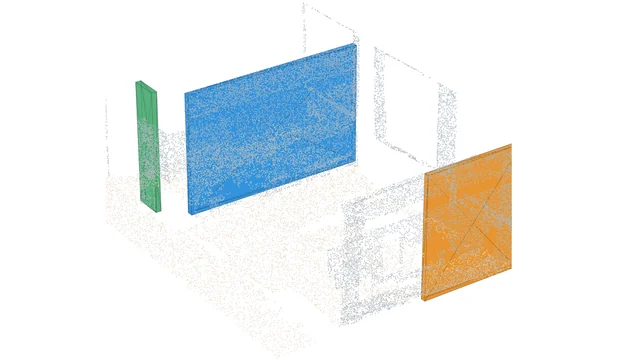
Two faces, one wall: an S3DIS office scan gives the thickness of three walls nobody touched, 13.78, 12.59 and 14.87 cm at mid-height, compared cell by cell, written as IFC4 walls with ifcopenshell and read back to prove it. About 1.3 seconds on a CPU.
The code
Public, no email needed. Read it, fork it, run it, break it.
wall_thickness_to_ifc.pyLevel, find the faces, pair them, measure cell by cell, write the IfcWall and prove it.prepare_s3dis.pyRebuilds the article’s office from your own S3DIS download (Area 1, 4 cm grid).visualize.pyThe stepped 3D replay, one Open3D window per step.check_determinism.pyThe thicknesses again, rerun, shuffled, rounded to 1 mm and with other normal neighbourhoods; writes out/robustness.json.tests/test_wall_thickness.pySeventeen pytest checks on synthetic walls of known thickness (python -m pytest tests -q).tests/synth.pyThe synthetic scans the tests measure, two rooms and a partition of known thickness.run.batWindows double-click runner, pipeline then replay.
The reference output
The files my run wrote, so you can check yours against them. Tell me where to send them.
measured_partitions.ifcThe three walls as IFC4 walls with their measured thickness, 166 entities, schema-valid. 11 kB.result.jsonEvery face, pair, thickness and check the article quotes, including the density profiles.
Data: Reference outputs computed by Florent Poux from S3DIS, Area 1: I. Armeni, O. Sener, A. R. Zamir, H. Jiang, I. Brilakis, M. Fischer, S. Savarese, 3D Semantic Parsing of Large-Scale Indoor Spaces, CVPR 2016.
Get the data: S3DIS, the Stanford Large-Scale 3D Indoor Spaces dataset
From the official page, download Stanford3dDataset_v1.2_Aligned_Version.zip, unzip it
anywhere, then run python prepare_s3dis.py --s3dis "path/to/Stanford3dDataset_v1.2_Aligned_Version" in the kit folder.
prepare_s3dis.py reads the whole of Area 1, puts it on the same 4 cm grid the article’s copy used, cuts out the office at the east edge of the area and writes the 191,353 points the article measured into a data/ folder next to the scripts, where wall_thickness_to_ifc.py looks for them. Nothing else from S3DIS is needed.
Stanford3dDataset_v1.2_Aligned_Version/Area_1/*/Annotations/*.txtRead. Every room of Area 1, one text file per object, named after its class. Only Area_1 is needed.data/s3dis_office.plyWritten next to the scripts. The office the article measured, 191,353 points.data/s3dis_office.ply.n3d.jsonWritten beside it. The class names of that file.
The numbers in the article come from S3DIS. Run the kit on your own scan and you get your own numbers.
Terms: Stanford’s registration form: “I will not redistribute the dataset in any way and in any format. Any new access will be established through this form and/or authors’ official method of releasing the dataset. I agree that the data and derivatives will be used only for non-commercial research and academic purposes.”
Get it from the official dataset pageThe page’s download link opens the dataset’s registration form.
Where should I send them?
One email, and the download links appear right here. You also get them in your inbox so you can come back to this any time.
Here they are
Yours to keep. Run the pipeline on this scene first to reproduce every number in the article, then point it at something of your own.
The same links are in your inbox. If nothing arrives, check spam, then mail me and I will send them by hand.

3D Data Science with Python
Building Accurate Digital Environments with 3D Point Cloud Workflows
This kit is one pipeline. The book is the discipline underneath them: 690 pages from the Python foundations through point cloud processing, meshing and the engineering that keeps a 3D workflow standing up in production. If the script above makes sense and you want the structure they came from, that is where it lives.
See the book or buy it on O’Reilly
Dr. Florent Poux
Founder and Lead Instructor at the 3D Geodata Academy. 15+ years on the automation of reality capture, from point clouds and photogrammetry to spatial AI, and 1,700+ citations across 60+ peer-reviewed publications.
I write on Medium · LinkedIn · YouTube · About · ORCID
These are the materials for Wall thickness from a scan, written to IFC, one of the tutorials I publish on Medium and on learngeodata.eu. Every kit lives at learngeodata.eu/materials/.
